Karpaka: a point of sale built to be trusted
Billing, inventory, purchasing and reports for a single sports retail shop. I designed the experience, built it, audited it before it handled real money, and released it to production in staged steps.
- Role
- Product designer and engineer, working solo
- Timeline
- First commit 12 Sep 2026. Hardened build live 8 Oct 2026. Three production releases by 19 Oct.
- Industry
- Retail
- Platform
- Web app for desktop and phone, light and dark themes
- Stack
- React web client, NestJS API, PostgreSQL (Supabase), Vercel
- Built with
- AI-assisted development (Claude Code)
- Status
- Live in production
- Services
- Business Software
Summary
Karpaka is the point of sale for one sports retail shop. A cashier bills at a counter with a barcode scanner or search. The owner buys stock on supplier credit and needs to know, at any time, what was sold, what it cost, what profit it made and what the shop owes.
That sounds simple until money is involved. A double-click can bill a customer twice. Two tills can sell the last unit. A cashier's screen can hide the profit while the data behind it still travels to the browser. Each of these shows up to a person at the counter as an error, a wrong total or a lost sale, so I treated them as design problems as much as engineering problems.
The problem
The shop needed one system for the whole loop from counter to supplier: bill a customer with GST, keep stock right, record what was bought and what is still owed, and report on profit. Different people use it. The owner sees everything. A cashier should only bill.
Three things made it harder than a typical shop app:
- Money has to be exact. Every bill is a GST tax invoice, and the shop has its own rounding rule for the discount and for each GST half.
- Several people act at once. Two tills, a held bill another person can resume, and stock that changes in the middle of a sale.
- Trust is uneven. The owner needs cost and profit. A cashier must never receive them, not even through the network.
Role and approach
I was the only designer and engineer: user flows, interface, data model, API, tests and releases. I used AI-assisted development (Claude Code) throughout, and I kept a written audit and a regression suite so that every claim about the system can be checked.
Flows before screens
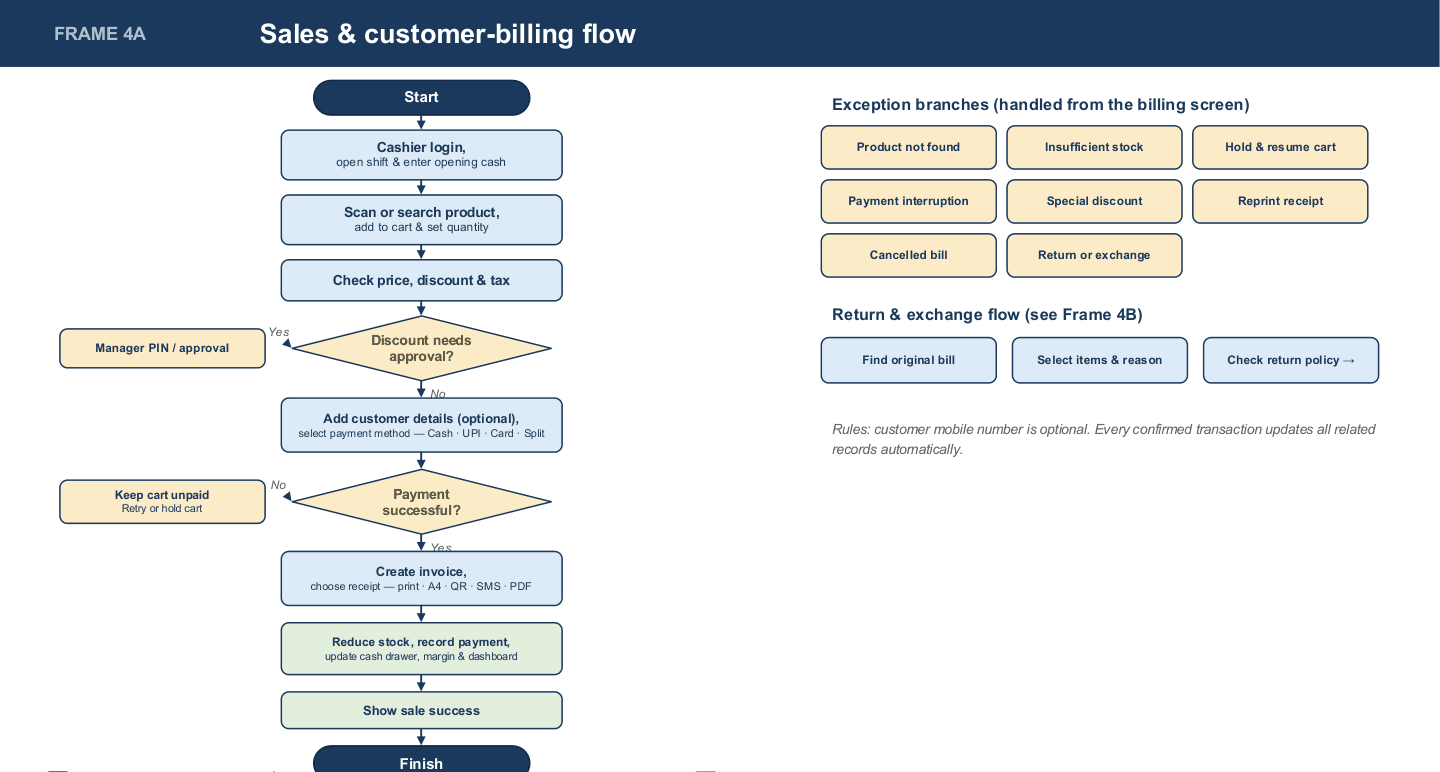
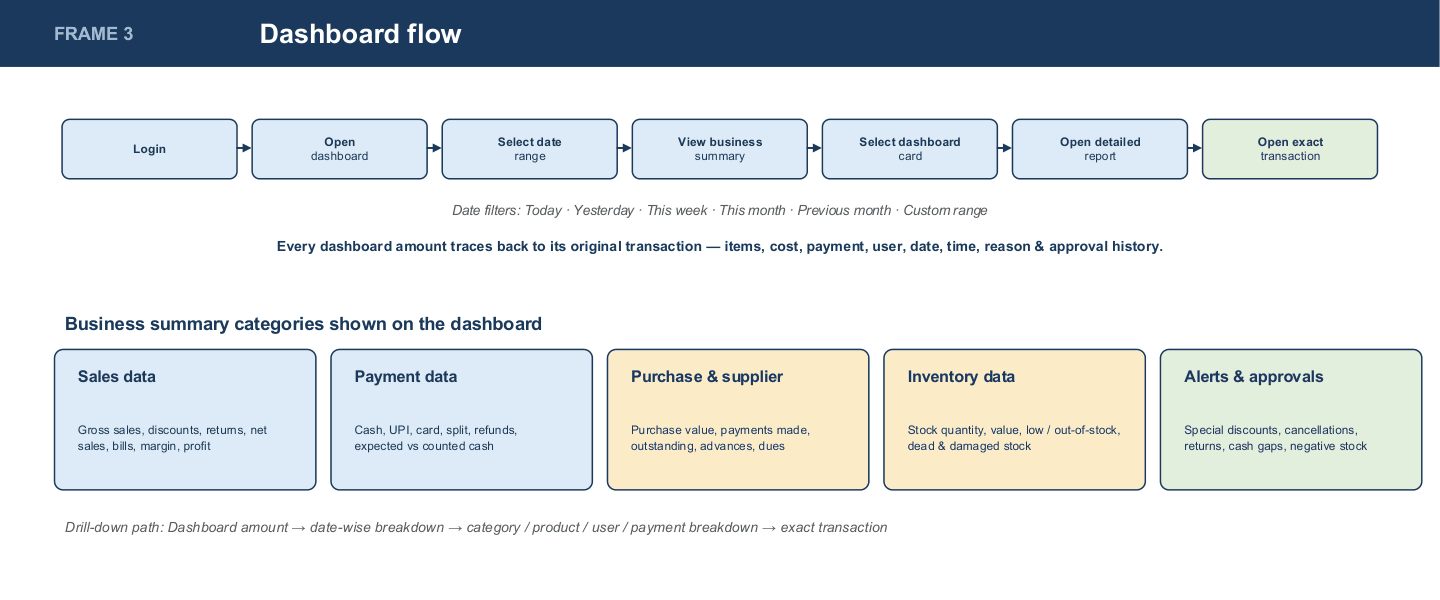
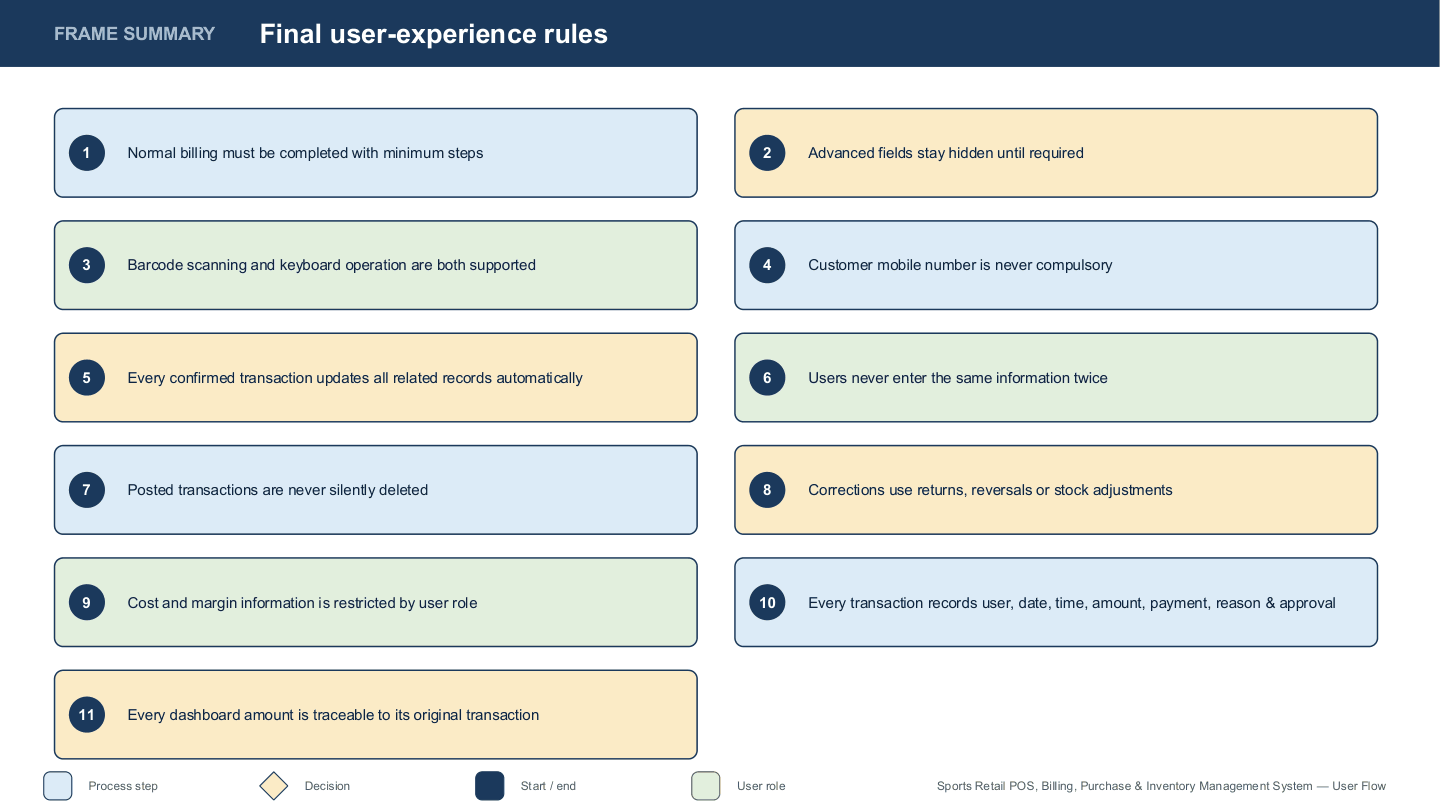
I started by drawing six flows: the whole application, login and roles, the dashboard and its drill-down, sales and billing with its exceptions, purchasing with supplier credit, and inventory (add a product, bulk import, stock count). The flows named six roles and set eleven rules that every screen had to obey. Among them: normal billing takes the fewest steps, advanced fields stay hidden until needed, the customer's mobile number is never compulsory, posted transactions are never silently deleted, cost and margin are restricted by role, and every dashboard amount traces back to its transaction.
Start big, then cut
My first build followed those flows at full enterprise scale: multiple stores, an approval engine, finance and cash, returns and exchanges. About three weeks in, I replaced it with a schema and interface sized for one shop. The shop needed a till, stock and supplier credit, not a retail platform. The enterprise modules stayed on disk, unreferenced and excluded from the build. The flows kept their principles, and the product kept only what this shop needed.
Key decisions
One primary action per screen
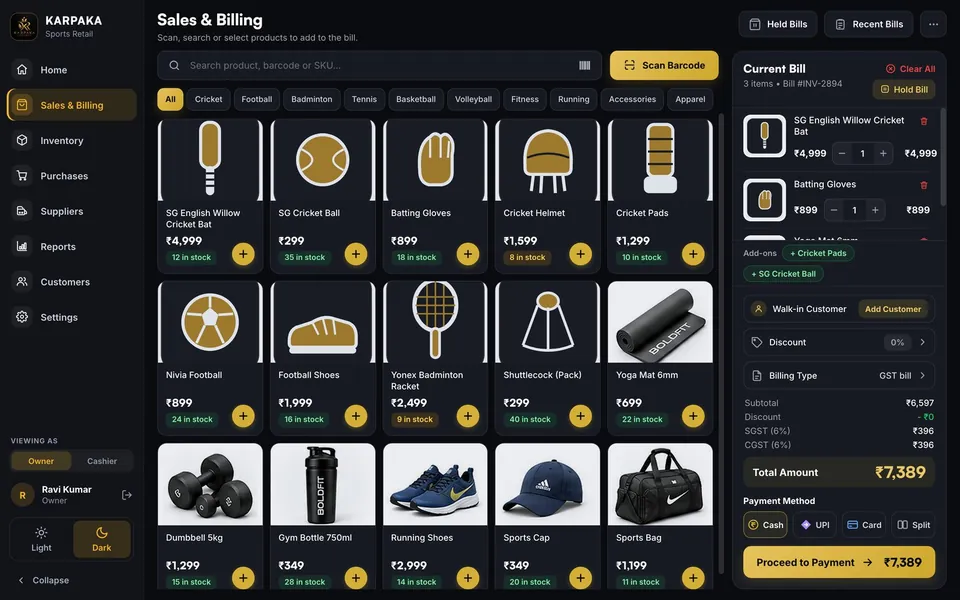
Decision. Solid gold is reserved for the one primary action on Sales, Proceed to Payment. The per-product add buttons, Scan Barcode and selected states became a gold tint with an outline.
Why. The Sales screen had 15 gold buttons, at least 11 of them the add buttons on product tiles. When everything is the main action, nothing is.
Trade-off. The add buttons are quieter, so I held them to a 44 px tap target on phones.
Billing in the fewest steps
Decision. Search or scan, tap to add, one bill panel, one payment dialog. The customer's mobile number is optional. The "GST or non-GST" choice was removed because every bill is a GST tax invoice.
Why. A cashier is serving a queue. Every field that is not needed to finish the bill is time at the counter.
Trade-off. Less customer data is captured. It is collected when the customer offers it.
The server decides who sees what
Decision. Permissions are checked on every request. A billing-only user never receives cost prices, profit, supplier balances, expenses or the customer list. The interface also hides owner-only items so the cashier never sees an empty or broken widget.
Why. The audit found that the previous build served cost, expenses, customer spend and profit to billing-only staff through the API. The screens had only hidden them. Hiding a button is not a permission.
Trade-off. Every endpoint carries a check, and every owner-only screen needs a designed state for staff without access.
Say what happened, in plain words
Decision. Errors name the product and the number ("only 2 left in stock"). If the total changed between the screen and the payment, the sale is refused, nothing is charged and the bill is corrected. The WhatsApp and SMS buttons say "Opening…" and never "sent", because the app has no messaging provider and cannot know.
Why. A cashier cannot debug an error code, and an interface should not claim something it cannot know.
Trade-off. Many more states to design and test. Each one has a browser test.
Profit that never changes after the fact
Decision. The cost of each item is stored on the sale line at the moment of sale. One service computes revenue, GST, cost and profit for Home, Reports and the KPIs.
Why. Before, a later purchase at a new cost rewrote the profit of past sales, and Home, Reports and the KPIs disagreed for the same day.
Trade-off. The costing method is now a data-model commitment. Changing it later means a migration.
Do not invent data the shop does not have
Decision. Product code and barcode are optional. Colours are separate stock lines, added with one plain question in the form: "Does this product come in different colours?" The bill and invoice name the colour.
Why. The old app made up a code for every product. The shop has some barcoded products and some without, and it counts colours separately.
Trade-off. For products without codes, name plus colour becomes the identity. Adding a duplicate name is refused with a pointer to "Add a colour".
Audit and hardening
Before the system handled real money, I audited all of it. The method was tests first. I wrote a regression suite that asserts what a correct system does, ran it against the previous build to get evidence, fixed the failures in priority order with the smallest safe change, kept the shop's own rules, and then ran everything again.
| Check | Previous build | Now |
|---|---|---|
| API regression checks | 38 of 111 pass | 127 of 127 pass |
| Unit tests | None | 69 |
| Browser checks, real Chrome, real login | None | 121 |
| Serious accessibility failures | 46 in the light theme alone | 0 on every screen and dialog, both themes, desktop and phone |
| Widths with sideways scrolling | Seen on first look | 0 of 9 (320 to 1920 px) |
Counts after the audit include checks added by later releases.
What mattered most
- Double billing. A double-click, a retry or a refresh after "Confirm payment" created a second invoice. Each sale now carries an idempotency key and commits in one database transaction, so a repeat returns the original invoice.
- Stock races. Two tills selling the last unit gave one success and one server error, and fast stock changes lost updates. Rows are now locked in a fixed order and stock moves by difference. The loser sees a clear message naming the product and what is left.
- Exposed financial data. Fixed with server-side permissions, as described above.
- Unstable profit. Fixed by storing cost at the time of sale.
- Wrong totals. The screen and the server could differ by a rupee at exact half-rupee ties. Both now use exact integer paise with the same rounding rule, and a parity test feeds both the same bills. If a price changes meanwhile, the sale is refused instead of charging a different total.
- Guessable PINs. Repeated wrong PINs now trigger a lock-out that is counted in the database, so it holds across serverless instances.
Proving it on production
I ran one controlled write test against the live system. A private backup was restored and compared with production table by table first. The whole test and its cleanup were rehearsed three times on a restore. Every test record carried a marker, and the cleanup deleted only records that were not in the baseline. 95 of 95 checks passed and production returned to its earlier state, row for row.
The test included a double-click on "Confirm payment" in the real web app (one request left the browser and the stock was deducted once), two simultaneous sales of the last unit (exactly one succeeded and the other was refused), and a cashier account calling restricted routes directly (every one refused).
The interface
The look is dark with a gold accent, with a full light theme. Accessibility checks run on every screen in both themes.
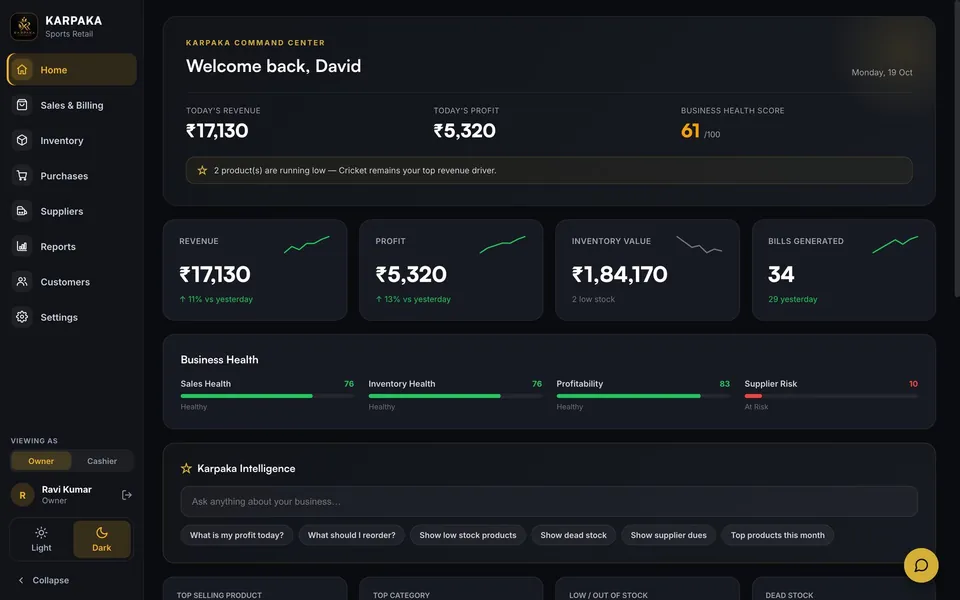
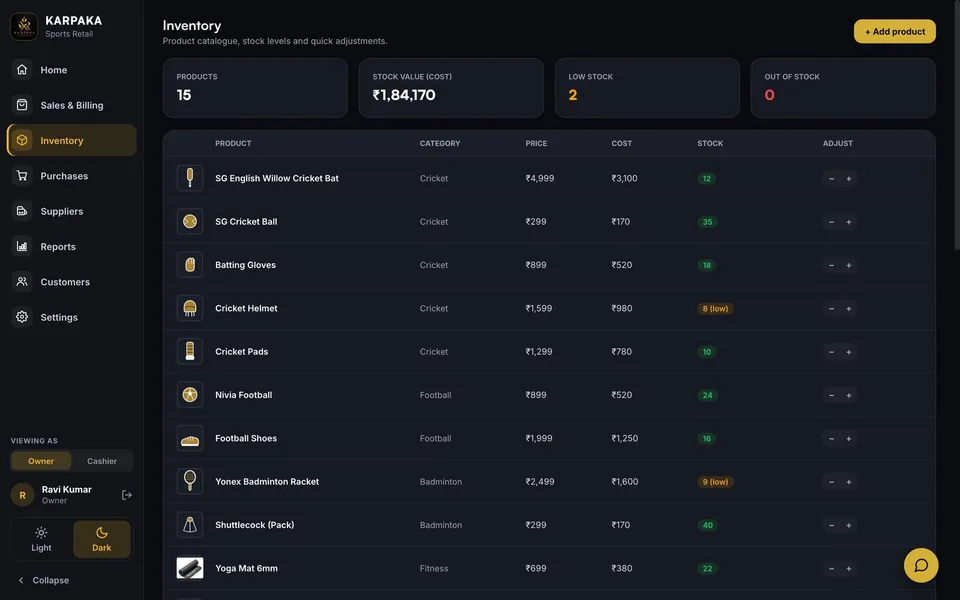
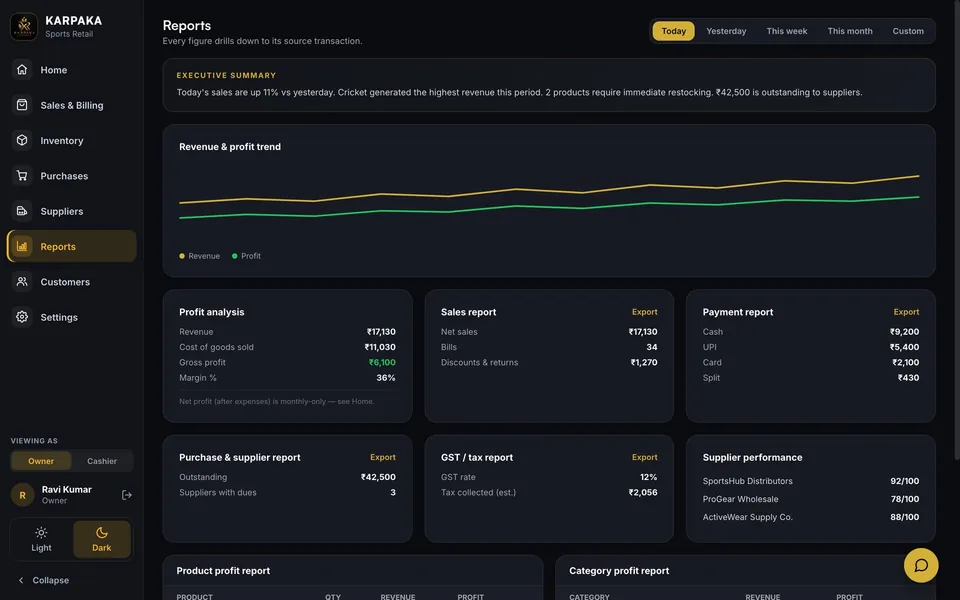
Screens show sample data. The live system is private to the shop.
Releasing safely
Releases follow a written runbook: database first, then the API, then the web app. Each step is deployed as a staged build, checked, and only then promoted. Migrations are additive, so the old build keeps working after the first step and there is never a moment when the shop cannot bill. Rolling back means promoting the previous deployment, which takes about ten seconds.
- 8 Oct 2026. Audit fixes released to production, with the write test above.
- 16 Oct 2026. Optional product codes and barcodes, colours as stock lines, USB and Bluetooth scanner support, and a GSTIN check that catches a mistyped character before it is printed on every invoice. Rehearsed first in a run on the real database that was rolled back.
- 19 Oct 2026. Interface polish, web only. I photographed 168 views (12 screens at 7 sizes in 2 themes) on the old and new builds. Accessibility findings went from 9 to 0, and controls under 24 px from 30 views to none.
What is still open
- Per-item GST rates. The app has one shop-wide rate, and one rate cannot be right for every item on a bill. Per-item rates are the next piece of work, and need the accountant's confirmation.
- Returns, voids and refunds. There is no flow yet. It is a scope decision to confirm with the shop.
- Older invoices. Recent Bills shows the latest 50 and searches within them. Search by date and invoice number is next.
- Devices. The audit ran in Chrome. Safari, Firefox and the shop's own printer are the next devices to cover.
- Monitoring. Errors go to the hosting logs only. Alerts are still to add.
What I took from it
- Cut scope early. The enterprise design cost about three weeks of building. Starting from the single-shop flow would have been faster.
- Test the old build first. Seventy-three failing checks were better evidence than any opinion about the code.
- A hidden button is not a permission. Roles have to be enforced where the data lives.
Need something like this built?
Tell us how your business runs today. We will map it to a system you can trust.